Endpoint documentation
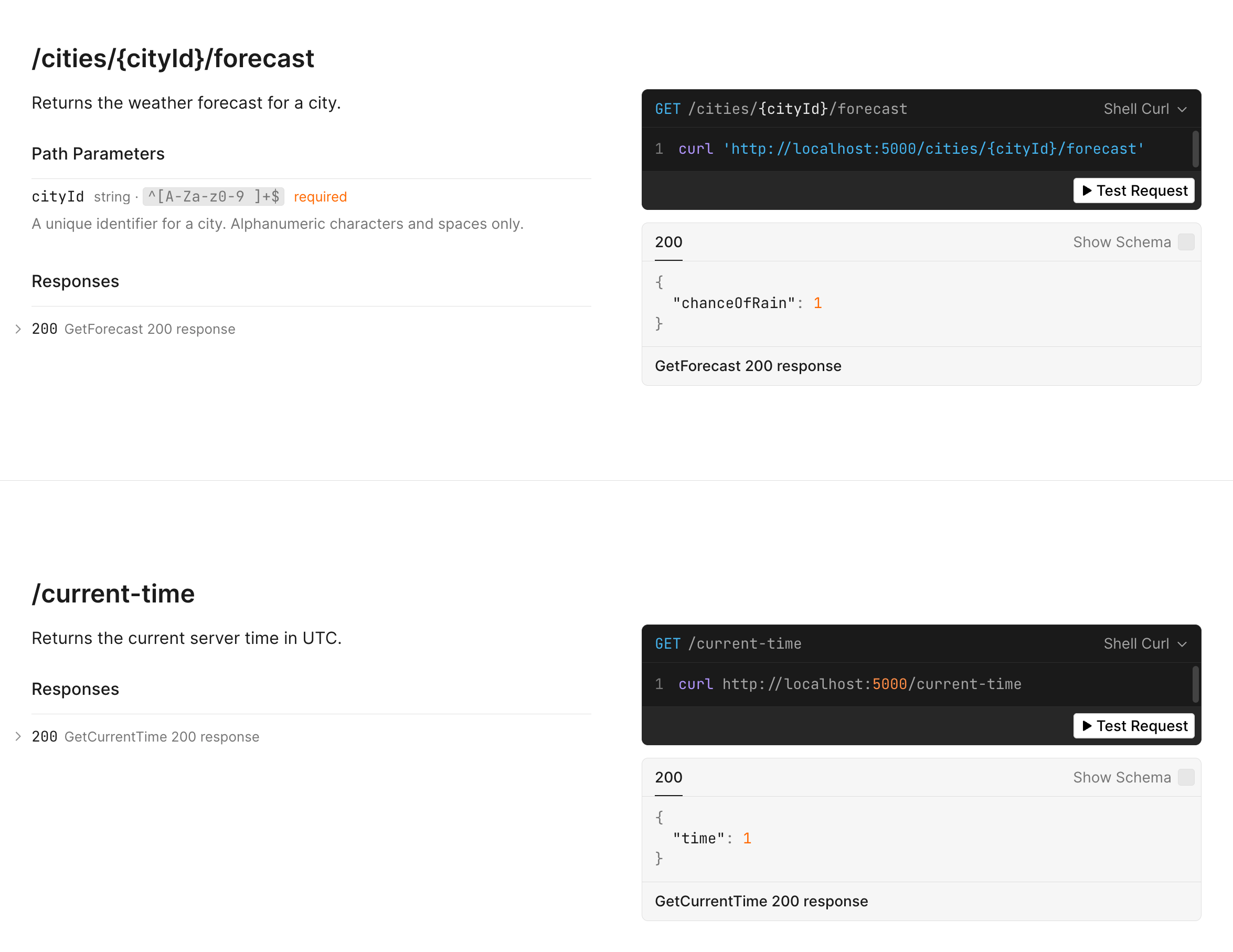
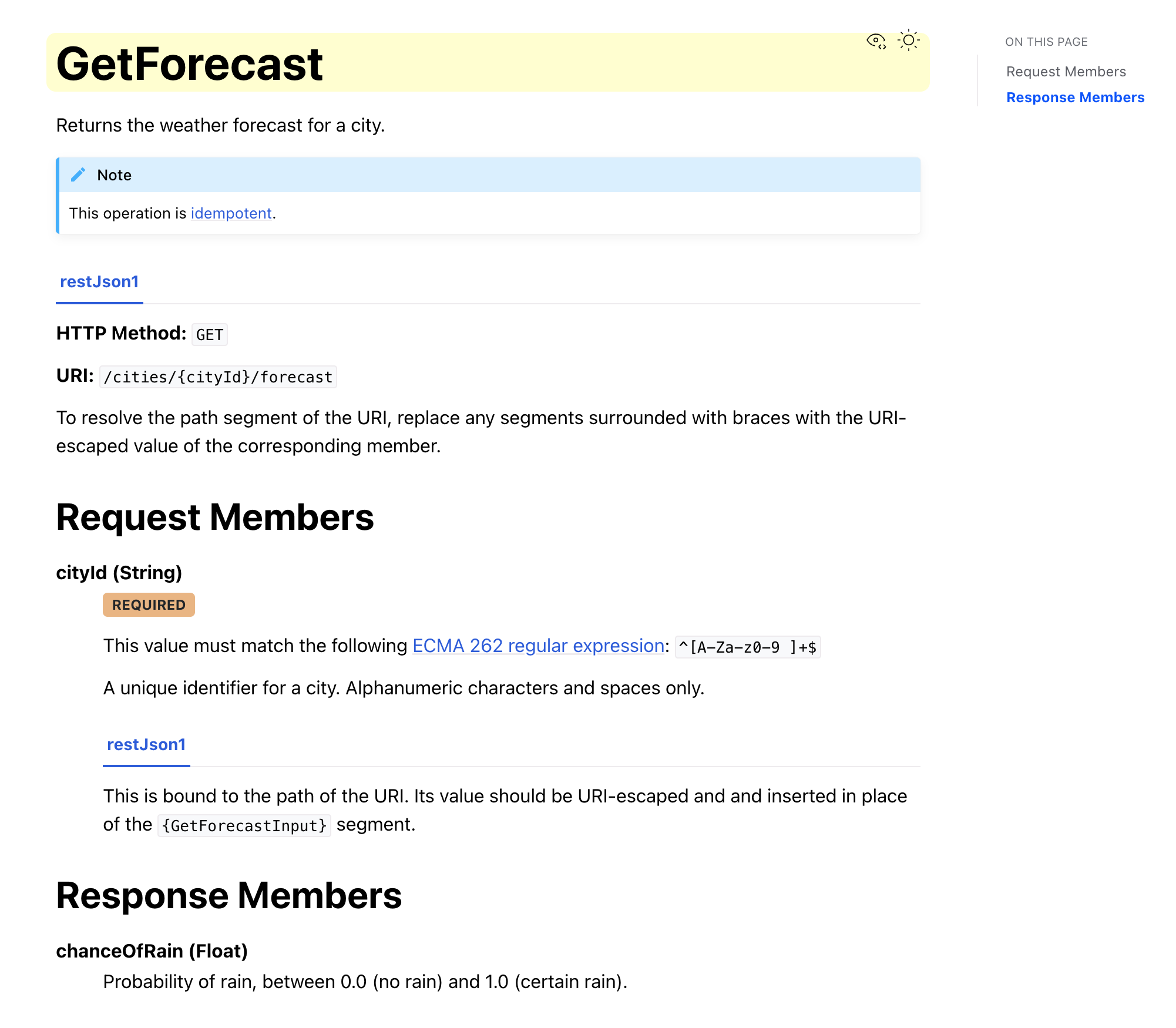
NSmithy can generate two documentation UIs from your Smithy model and serve them alongside your ASP.NET Core application:
- Scalar: an interactive OpenAPI explorer at
/openapi, backed by aopenapi.jsongenerated from the model by smithy-openapi. Available for AWS restJson1 services. - Sphinx HTML: auto-generated reference documentation at
/docs, produced by smithy-docgen and compiled to HTML automatically at build time. Available for all services.
Both are opt-in MSBuild features. Their output is copied into wwwroot/, where
ASP.NET Core’s static file middleware can serve it.
Install the package
Section titled “Install the package”Add NSmithy.Server.AspNetCore.Docs to your server project:
<PackageReference Include="NSmithy.Server.AspNetCore.Docs" Version="0.14.0" />This package provides the MapSmithyOpenApi() and MapSmithyDocs() extension
methods.
Enable the generators
Section titled “Enable the generators”Set the MSBuild properties you need in your server .csproj:
<PropertyGroup>  <!-- Generate Sphinx HTML documentation (all services) -->  <SmithyGenerateDocs>true</SmithyGenerateDocs>
  <!-- Generate openapi.json for AWS restJson1 services -->  <SmithyOpenApiProtocol>aws.protocols#restJson1</SmithyOpenApiProtocol></PropertyGroup>
Both properties are disabled by default and take the service from
SmithyService. Sphinx generation requires Python 3.11+ on the build host.
Further docgen or openapi plugin settings go in the project’s
smithy-build.json.
Register the endpoints
Section titled “Register the endpoints”Map the generated documentation endpoints in Program.cs:
using NSmithy.Server.AspNetCore.Docs;
var app = builder.Build();app.MapSmithyOpenApi(); // mounts Scalar at /openapi (requires SmithyOpenApiProtocol)app.MapSmithyDocs();    // serves Sphinx HTML at /docs (requires SmithyGenerateDocs)app.MapMyService();app.Run();
MapSmithyOpenApi() enables static file serving and mounts Scalar at
/openapi. The UI reads /openapi.json, which is generated from the model and
copied to wwwroot/openapi.json at build time.
MapSmithyDocs() enables static file serving and redirects /docs to
/docs/index.html. smithy-docgen builds the Sphinx HTML during dotnet build;
MSBuild then copies it to wwwroot/docs/.
Generated output
Section titled “Generated output”On dotnet build, NSmithy:
- Runs
smithy buildwith thedocgenplugin (andopenapiplugin ifSmithyOpenApiProtocolis set). - smithy-docgen bootstraps a self-contained Python venv with Sphinx, builds the
HTML, and writes it to
obj/<config>/<tfm>/Smithy/source/docgen/build/html/. - MSBuild copies the HTML to
wwwroot/docs/and the OpenAPI spec towwwroot/openapi.json.
DirectoryMyService.Server/
Directorywwwroot/
Directorydocs/
- index.html Sphinx reference docs, served at
/docs - …
- index.html Sphinx reference docs, served at
- openapi.json read by Scalar at
/openapi
Ignore only the generated files:
/wwwroot/docs//wwwroot/openapi.jsonModel requirements
Section titled “Model requirements”smithy-docgen validates that input and output structures follow the Smithy best
practices before generating documentation. Specifically, structures used as
operation inputs or outputs must carry the @input or @output trait, and the
same structure must not serve as both the input and output of an operation.
Inline inputs and outputs apply these traits automatically:
operation Echo { input := { @required message: String } output := { @required message: String }}For named structures, add @input and @output explicitly and use a distinct
shape for each role.